
Exitru split tunneling: domains, IP addresses and rule sets
Choose VPN or direct routes. A detailed guide to modes, domain and address rules, sets, effective-route checks and moving rules between devices.
Split tunneling sends selected sites and addresses through the VPN while the rest connect directly, or does the reverse. In Exitru, you create a rule set and then assign it to a mode. This guide explains both approaches, exact domains, subdomains, IP addresses, CIDR and checking the effective route.
Start with the route you want
Suppose a banking app should connect directly while selected video services use the VPN. There are two ways to express that intention. Choose based on where all other traffic should go, rather than which switch looks more familiar.
| Mode | Matches an assigned set | Does not match |
|---|---|---|
| Only what’s listed | Through the VPN | Directly |
| Everything except what’s listed | Directly | Through the VPN |
| Off | Sets do not participate | All traffic through the VPN |
In Only what’s listed mode, list services that need the VPN. In Everything except what’s listed mode, list direct exceptions, such as your bank. Sets assigned together are combined: this is not an ordered queue where an upper row overrides a lower one.
Off turns off split tunneling, rather than the VPN connection. When the tunnel is connected, this mode returns to ordinary routing through it. Make sure you are not confusing these two states before testing.
Step 1. Open split tunneling
In Windows, open Settings → Split tunneling. The screen has Mode, Lists and Scan tabs. Mobile layouts differ; look for the traffic-splitting setting rather than a server with that name.
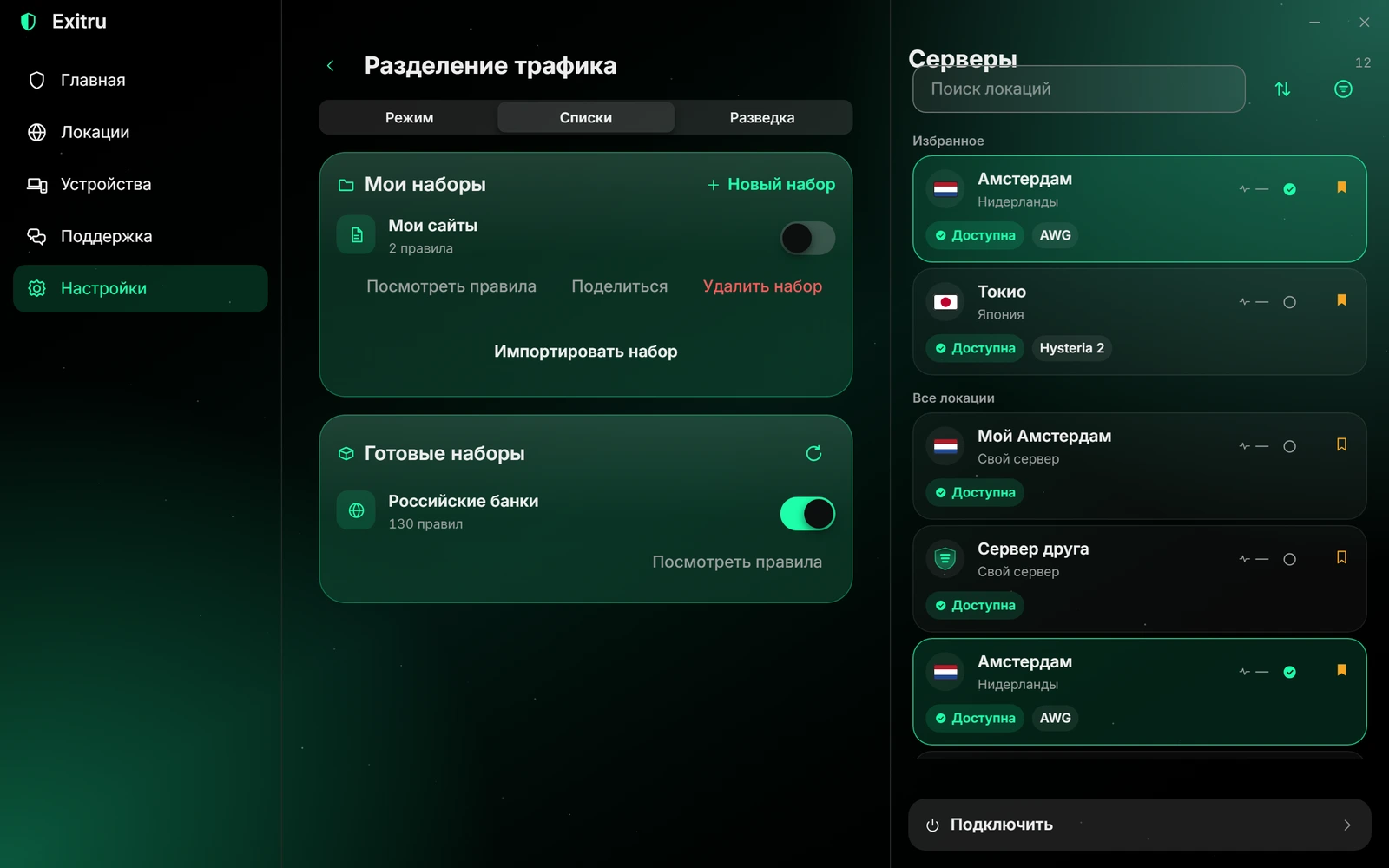
A real Windows 1.0.45 app capture in Russian. «Режим», «Списки» and «Разведка» are Mode, Lists and Scan. Set names, locations and counts are demonstration data. The website diagram does not change the app’s settings.
If the app says splitting is unavailable for the current protocol, build or account, your saved selection is not proof of effective split routing. Read the effective-state message first. Do not depend on a direct exception until that state has been confirmed.
Step 2. Create a small, understandable set
In Lists, choose New set and give it a meaningful name, such as Through VPN or Bank direct. The name helps you navigate, but it does not select the action. The same domain takes a different route depending on the mode the set is assigned to.
Add rules whose purpose you can explain. One domain is enough for the first check. A large imported list makes troubleshooting harder: you will not know which of hundreds of rules produced a result.
Inspect ready-made sets before enabling them. Read their contents and purpose. Banks in a set name does not guarantee that it includes every address used by your banking app, or that those addresses will never change.
A domain and a domain with subdomains are different rules
An exact Domain rule for example.com matches only that name. It does not match api.example.com. A Domain and subdomains rule for example.com includes both the base name and names below it, such as api.example.com and cdn.example.com.
However, otherexample.com is not a subdomain of example.com. Matching respects boundaries between name labels, rather than a similar text ending. A top-level suffix such as com is too broad for an ordinary domain-and-subdomains rule.
Enter a host name without https://, a page number or a path such as /watch. These rules do not select individual pages. For example, example.com/work does not mean all work-related pages. Identify the host example.com, then decide whether to include its subdomains.
The interface may display *.example.com to explain a subdomain rule’s scope. That is not an invitation to enter arbitrary regular expressions. An internationalized name may appear in normalized ASCII form beginning xn--…; check that it is the intended name.
IP addresses and CIDR ranges
An IP rule matches a single address, such as 192.0.2.10. It is useful when a service is accessed by address rather than name. CIDR describes a range: 192.0.2.0/24 is an IPv4 subnet example. The number after the slash is the network-prefix length; see RFC 4632 for the notation.
The ranges 192.0.2.0/24 and 2001:db8::/32 in this article are documentation examples, rather than usable service addresses. Use verified service addresses in your own rules, and consider IPv4 and IPv6 separately.
Do not replace a domain rule with one IP copied from a DNS lookup without a reason. A service may change addresses, use multiple data centers and share a CDN with other services. A broad subnet may include unrelated sites; one exact address may stop matching after a DNS change.
Avoid adding 0.0.0.0/0 or ::/0 for a single app: those cover an entire address family. A wider rule affects more traffic. Check the mode and address rules together.
Example A. Only what’s listed sites through the VPN
Create a Through VPN set and add the domain you want to start with. Choose the subdomain option if appropriate. Assign the set to Only what’s listed using the mode’s set selector, and check that its name appears under that mode.
Connect the VPN, run the built-in check and open the service using a new connection. Other traffic goes directly when splitting is effective. This is a deliberate choice: unlisted services should not be assumed to use the tunnel automatically.
Do not add only youtube.com and assume every video app action is covered. Services use separate APIs, media domains and CDNs. Begin with a suitable reviewed set or use Scan to investigate real domains. Verify the result before expanding the list.
Example B. A bank directly, everything else through the VPN
Create a Bank direct set, add the verified domains and assign it to Everything except what’s listed. Matching traffic goes directly; the rest uses the VPN. Do not assign the Through VPN set to this mode expecting its name to change the action.
If the bank needs several names or fixed addresses, add them after verification. Do not blindly copy a list from an unknown message. For a banking app, it is especially important not to turn a narrow direct exception into a wide range belonging to a shared cloud.
When switching between the two modes, review the sets assigned to that particular mode. The app remembers mode assignments on the device; do not assume every local per-mode preference is automatically transferred to a second phone.
Why a site may take an unexpected route
Exitru uses DNS and destination-address information to match domain rules. An existing connection and a cached response can outlive a list change. New rules apply to new connections; close the app or connection you are testing and repeat the request.
A browser may use its own DNS-over-HTTPS. This protocol transports DNS over HTTPS, as specified in RFC 8484. Such a request is different from an ordinary system-resolver query. Check whether the request reached Exitru’s resolver rather than drawing conclusions from a single external-IP result.
Other common causes are the wrong domain-rule type, a set not assigned to the mode, an unsupported protocol or the setting that blocks traffic outside the VPN. That last setting conflicts with direct egress; the app explains when splitting is disabled as a result and all traffic stays in the tunnel.
In Only what’s listed mode with no enabled sets, the current implementation displays a warning and keeps all traffic in the VPN. An empty set is not a way to disconnect the tunnel. If a build does not understand an assigned rule, check the effective-state warning instead of guessing the outcome.
Step 3. Verify the effective result
The built-in check appears on the mode tab and requires a connected VPN. It compares results for several names with the effective rule set. Look beyond the headline: did a rule match, which route was determined, and did the request reach the intended resolver?
Success for several tested names does not establish coverage of every request a complex app makes. Check distinct actions, including sign-in, playback and file transfers. If one action fails, investigate its names instead of expanding the exception to the entire internet.
Windows can add program rules, including selecting an .exe from disk or a currently running program. Such rules depend on the process information the system provides. Program names, Android capabilities and Apple capabilities are not interchangeable; domain and address rules are easier to transfer across platforms.
Importing, exporting and sharing a set
Open a local set and choose Share. Depending on its size, a code, link and file are available. A large set may not fit in a code; use a file rather than deleting useful rules randomly to shrink it.
A rule-sharing link is not encrypted. Its recipient can read the listed names and addresses. Do not include secrets or publish internal work domains unnecessarily. Sending a link through a messenger is your choice of recipient and channel; it is not automatic private synchronization by Exitru.
Review the rules before importing. The app creates a new set instead of silently replacing your existing list. After saving, assign it to the intended mode yourself. Repeated imports may create another copy; inspect the list before enabling it.
Program rules need a separate check on the other device: the program may be absent or have another name. Sharing a rule set does not transfer a subscription, server keys or an active VPN connection.
Keep the setup simple enough to verify
Start with one mode and a small set. Confirm the effective state, test new connections and only then expand the rules. If a problem remains, contact support with the mode, platform, version and built-in check result. Avoid exposing personal domain lists in a public report unnecessarily.
Need the app first? Visit downloads. The ready-to-use network requires an Exitru plan; a VPS has its own setup guide.
Frequently asked questions · FAQ
Does a set itself choose what uses the VPN?
No. A set defines matches; the mode defines the action. A direct-exception set for Everything except what’s listed cannot be treated as a VPN list in another mode without reviewing the result.
Does importing immediately change the route?
Import creates a new set. Review it and assign it to the intended mode yourself; transferring a file does not confirm an effective route.
Why can a playing video keep its old route after saving?
An existing connection may retain its old route. Test new connections and the built-in check rather than relying solely on playback that was already running.